
Legal
How people opt in to texts
Every way someone agrees to receive text messages through TownRep, exactly as they see it.
TownRep runs two text-messaging programs. Both are transactional and informational only — no marketing or promotional messages are sent in either. In both, the person opts in by ticking a box that starts unticked, and ticking it is optional: nothing else depends on it.
- Account alerts to business owners — TownRep texts the owners who use it about activity on their own account.
- Replies to a business’s customers — TownRep texts a person who contacted a business through that business’s website, about the request they made, on the business’s behalf.
TownRep is operated by TownRep LLC, an Illinois limited liability company. Questions about either program: devin@townrep.com.
1. Business owners — alerts about their account
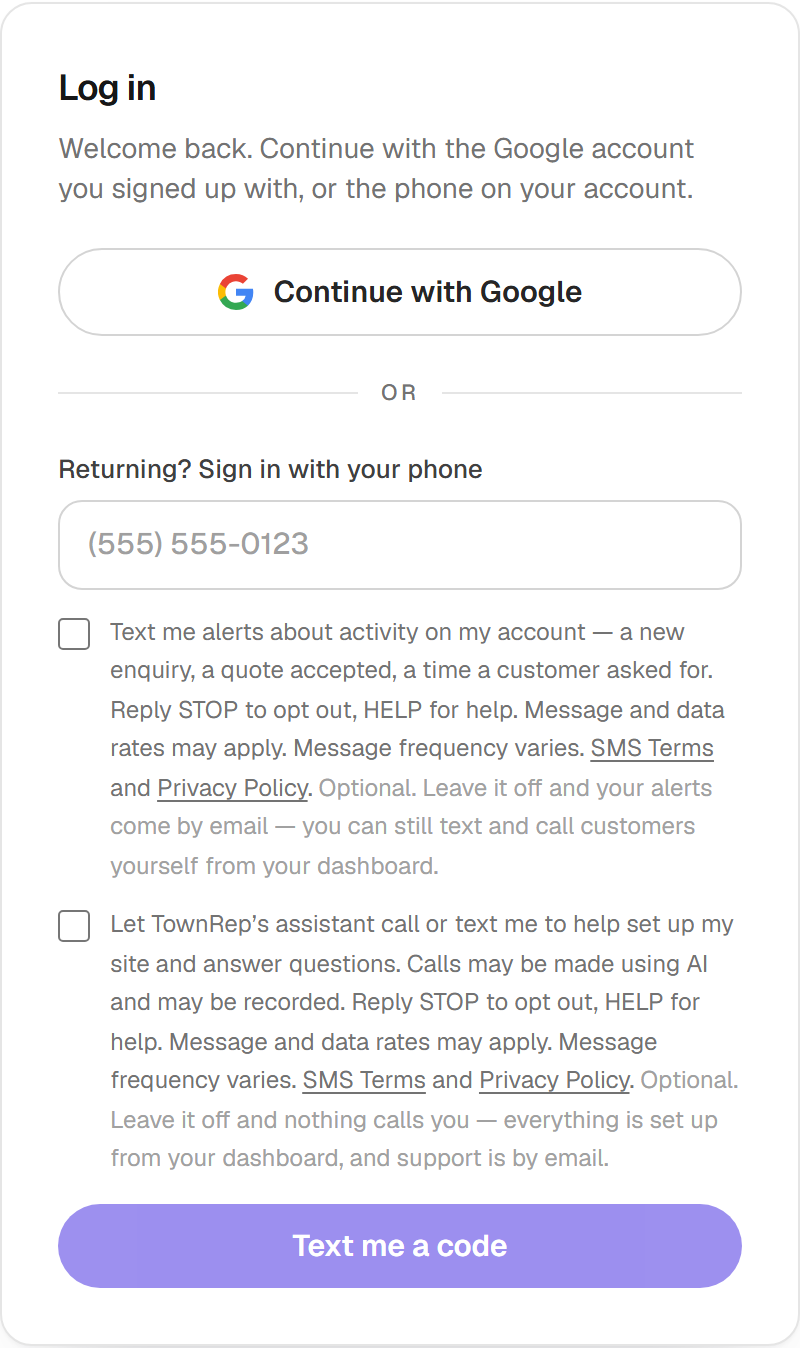
Where: when an owner creates their TownRep account or logs in, at app.townrep.com, on the step where they enter their mobile number. The dashboard is in private beta, so a visitor without an invitation sees a sign-in wall there — which is why the step is reproduced here and shown as a screenshot below.
Who sends them: TownRep LLC. Every alert starts with “TownRep:” and goes only to the owner’s own number.
The step shows two boxes, both unticked. The first is the text-alert opt-in:
Each links to our SMS Terms and Privacy Policy. Neither is required to create an account or use TownRep: an owner who leaves the first unticked gets the same alerts by email. The number is then confirmed with a one-time code, so nobody is enrolled without holding the phone. What was ticked is stored with the exact wording and the time.
2. A business’s customers — replies about their request
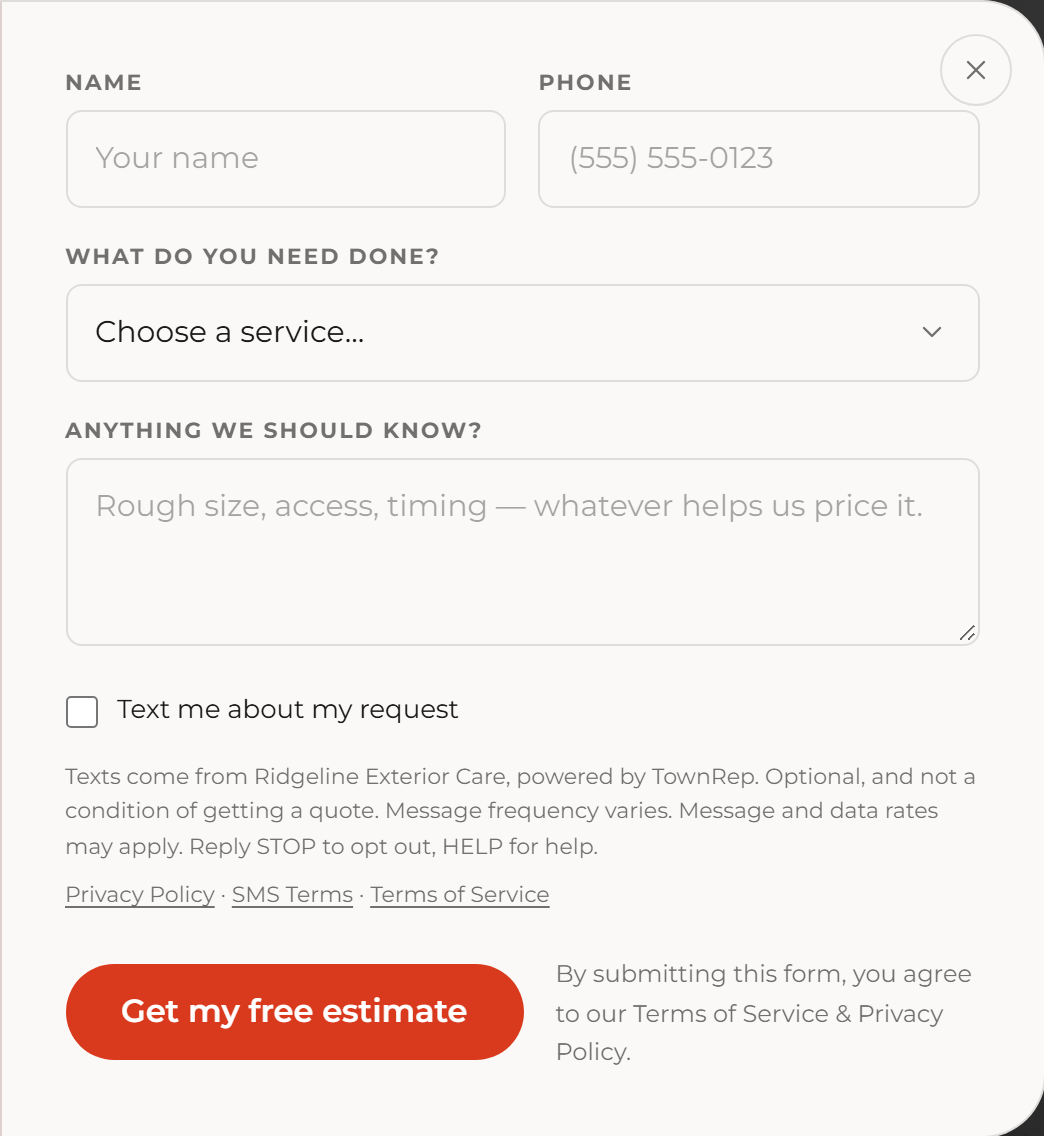
Where: the contact form on the business’s own website, which is public. For example, open a live business site built on TownRep and choose “Get my free estimate”. Above the submit button the form shows:
Texts come from Ridgeline Exterior Care, powered by TownRep. Optional, and not a condition of getting a quote. Message frequency varies. Message and data rates may apply. Reply STOP to opt out, HELP for help.
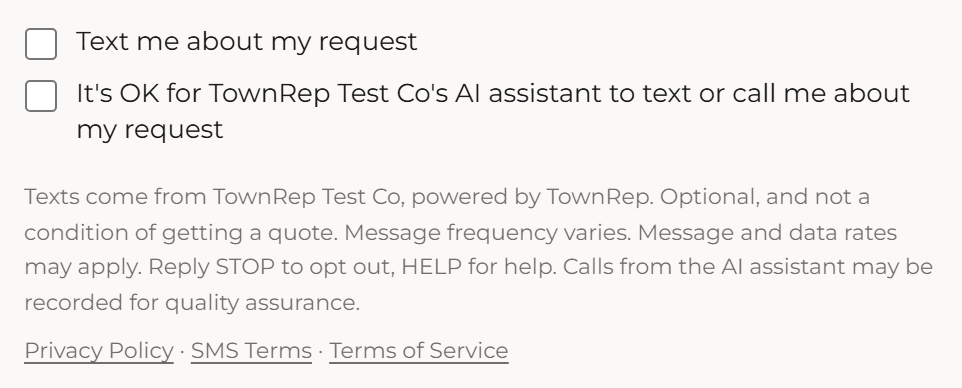
When the business uses an AI assistant, the form offers a second box — the assistant texts or calls the person only if they tick it, and texts still need the first box:
Texts come from Ridgeline Exterior Care, powered by TownRep. Optional, and not a condition of getting a quote. Message frequency varies. Message and data rates may apply. Reply STOP to opt out, HELP for help. Calls from the AI assistant may be recorded for quality assurance.
Both link the Customer Privacy Policy, SMS Terms and Terms of Service. The form sends the request whether or not a box is ticked; a person who ticks nothing is not texted at all, and the business replies by phone or email. Each request stores which boxes were ticked, their exact wording, the time, the page, the IP address and the browser, so the consent can be produced later.
A person may also text the business’s number first. The reply answers their message, and nothing is sent to anyone who has not contacted the business themselves. A person who calls the business’s number and is not answered gets one text back on the number they called from, which starts the same conversation; replying STOP ends it.
Stopping
In both programs, reply STOP, STOPALL, UNSUBSCRIBE, CANCEL, END, QUIT, REVOKE or OPTOUT to any message to stop, START or UNSTOP to rejoin, or HELP or INFO for help. Where a business’s automated assistant replies to its texts, a request to stop in your own words (for example, “stop texting me”) is honoured the same way. Message frequency varies. Message and data rates may apply. Mobile numbers and opt-ins are never sold, rented or shared for marketing. Full details are in the SMS Terms.